At Dragon Pop Studio, we respect your privacy and provide a transparent way to manage and delete your personal data. Below are the detailed steps to request data deletion.
Method 1: In-App Deletion (Recommended)
This is the fastest way to delete your data. This action will remove your local and server data immediately.
Step 1: Open Settings
Launch the game and tap the “Gear” icon (Settings) located in the top right corner of the home screen.
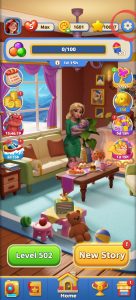
Step 2: Find the Delete Option
At the bottom of the Settings menu, look for the blue text link labeled “Delete Data”.
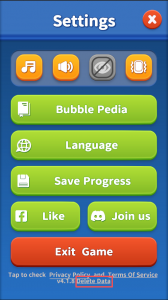
Step 3: Initial Confirmation
A pop-up will appear warning: “Deleting data will erase all progress. You cannot continue playing.” Tap “OK” to proceed.
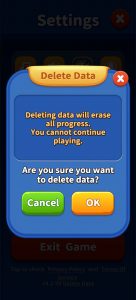
Step 4: Final Confirmation
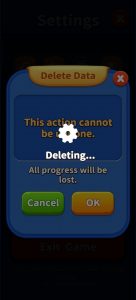
A final warning will state: “This action cannot be undone. All progress will be lost.” Tap “OK” to confirm your choice.
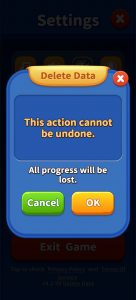
Step 5: Process Completion
You will see a “Deleting…” status. Once finished, all your data, including game progress and purchases, will be permanently erased.
Method 2: Facebook Data Deletion
If you have linked your game to Facebook, you can also manage your data via Facebook’s “Apps and Websites” settings.
Log in to your Facebook account and go to Settings & Privacy > Settings.
Select Apps and Websites from the left-hand menu.
Find [Your Game Name] and click Remove.
In the pop-up, check the box that says “Send a request to [Your Game Name] to delete your data” and click Remove.
[Note: Facebook will automatically notify our servers to delete your data.]
Method 3: Email Support Request
If you have already uninstalled the app and cannot access the in-game settings, you may contact us directly.
Support Email: supports@dragonpopstudio.com
Required Info: Please provide your Player ID (found at the bottom of the Settings menu) or the email address linked to your account.
Timeline: We will process your request and confirm the deletion within 30 days.
Important Notice:
Permanent Action: Data deletion is irreversible. You will lose all levels, coins, and items permanently.
Account Recovery: Once deleted, the account cannot be recovered. You must start from Level 1 if you choose to play again.